

Maintenance management • CMMS
Yantra Paalan
यन्त्र पालन — the care of machinesPractical Digital Maintenance Management for Manufacturing Plants
Bring your plant maintenance activities into one organized digital workflow with Yantra Paalan — designed for manufacturing teams that want a practical, easy-to-use and cost-conscious CMMS solution.
Live on the App Store for iPhone and iPad, and on Google Play for Android.

The problem
Maintenance Teams Deserve Better Than Spreadsheets and Paper
Many plants experience some version of the same week: a breakdown slip written by hand, a technician found by phone, a register filled in at the end of the shift, and a monthly report assembled from all three at the last minute.
What changes
From Reactive Maintenance to Organized Digital Maintenance
Paper slips
↓Excel sheets
↓WhatsApp messages and calls
↓Scattered information
↓Limited visibility
Digital assets — every machine, by section
↓Maintenance activities — breakdowns and PM as work orders
↓Centralized records — one history per machine
↓Better visibility — status, approvals, KPIs
↓Structured maintenance
Software does not fix machines. It makes the work around them visible, so the plant can see what is happening and decide what to do next.
Features
Everything the Maintenance Team Does in a Day, in One App
Every feature below is in the current release of Yantra Paalan. The screens are from the app itself, running on demonstration data.
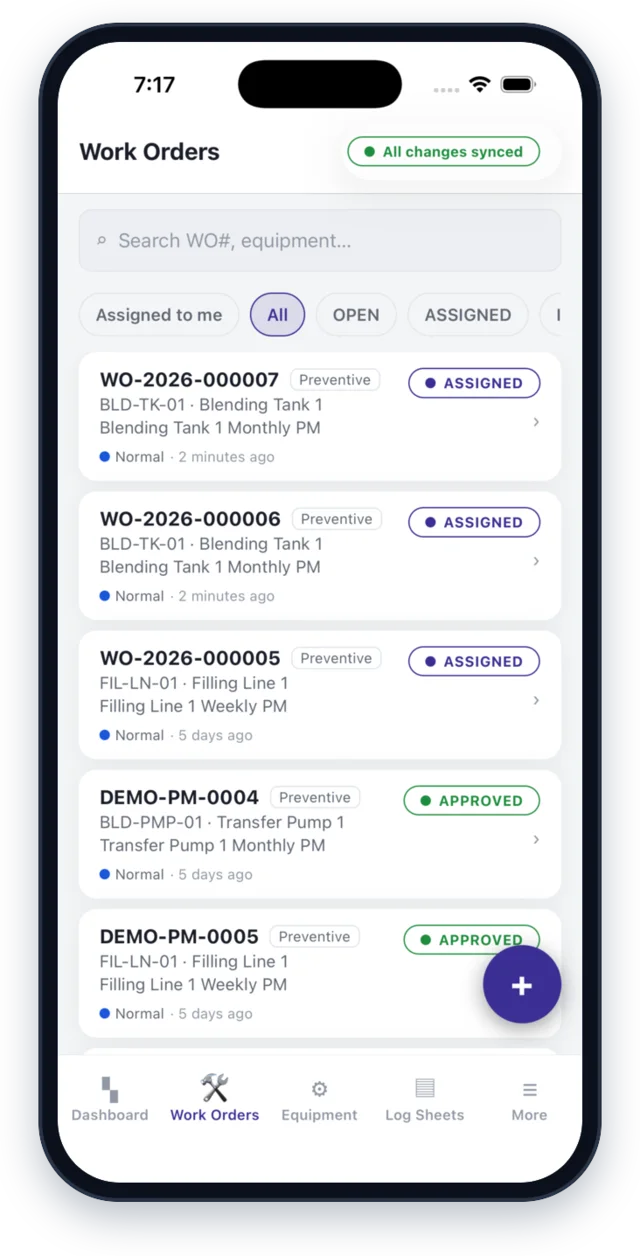
Breakdown work orders
Raise a breakdown at the machine: pick the equipment or scan its label, describe the fault, set the priority, mark whether it stops production, and attach photos. A job first written on a paper slip can be entered later with “From slip”.
Work orders, tracked to approval
Every job moves through the same steps — raised, assigned, started, repaired, completed, approved. The repair log records root cause, labour hours, parts used and photos. Only approved work feeds your reports, and a job's history cannot be edited after the fact.
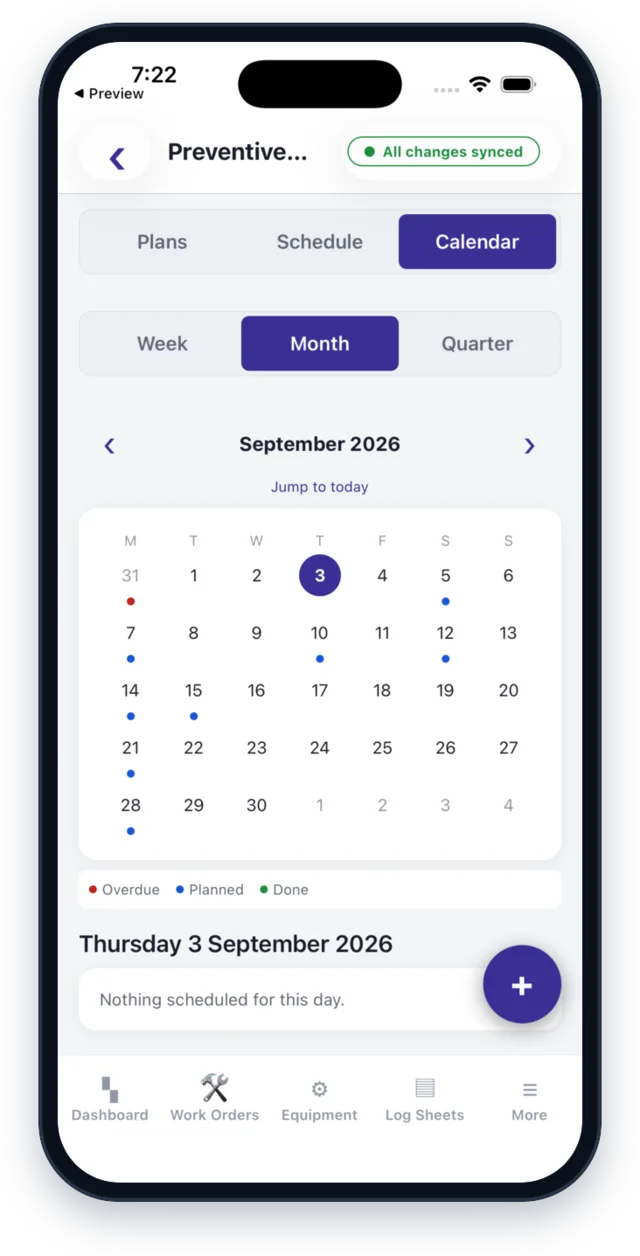
Preventive maintenance
PM plans with checklists for each machine. Jobs are created automatically when a plan falls due, and the PM calendar shows what is planned, done and overdue by week, month or quarter. A technician can ask to hand a PM job to a colleague, with approval built in.
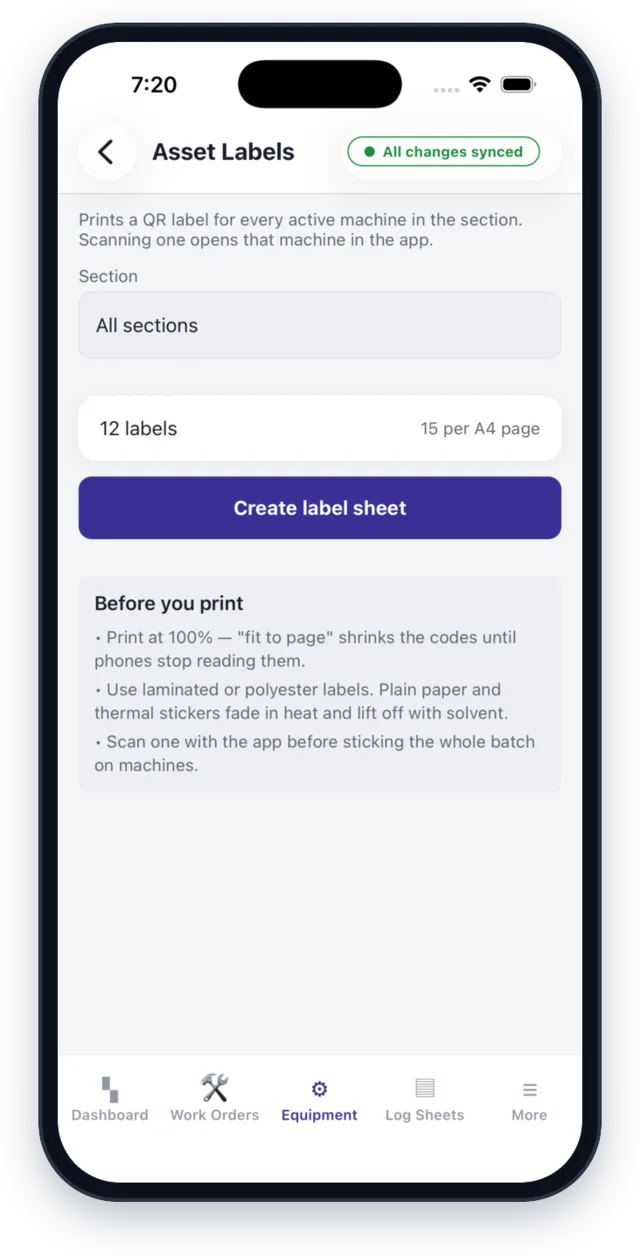
Equipment and QR asset labels
An equipment master organized by plant section. Print a QR label for every machine; scan it to open the machine's record or to raise a job against it. Every breakdown, PM and spare part used stays on that machine's history.
Spare parts inventory
Stock for every part, with minimum levels and a low-stock alert on the dashboard. Parts are issued and returned against the work order that used them, so stock and cost are tracked job by job.

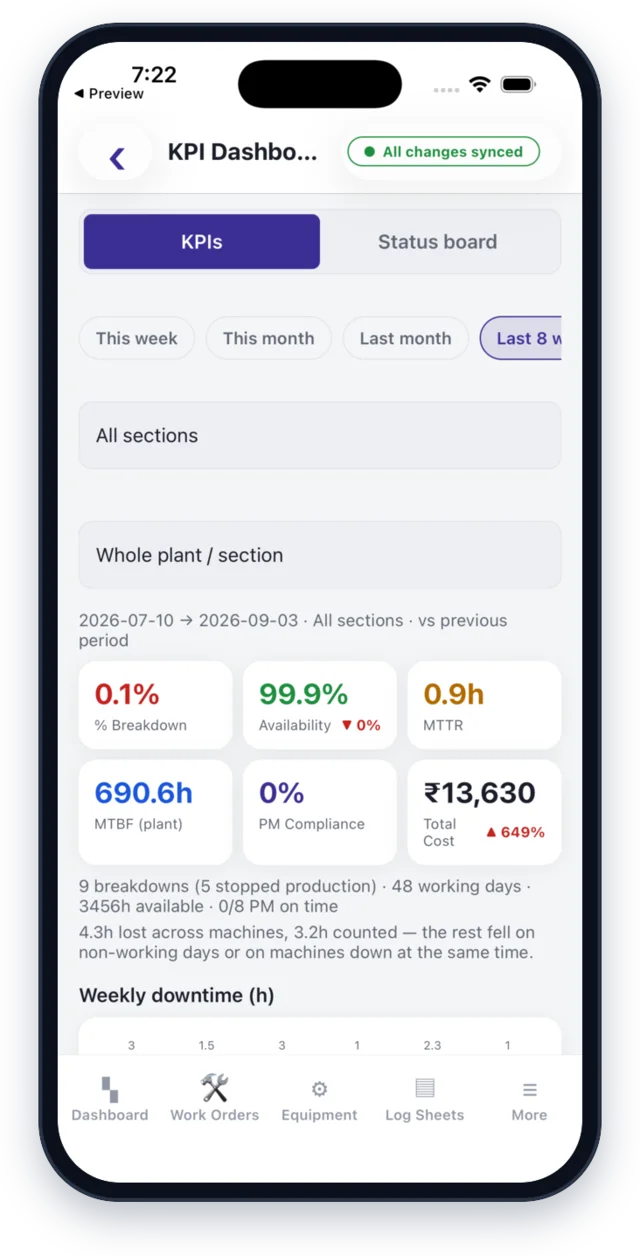
Maintenance KPIs
Availability, MTTR, MTBF, breakdown percentage, maintenance cost and PM compliance — for the whole plant, a section or a single machine — with a Pareto of the problems that cost the most time.
And the everyday details
Daily log sheets
Operator check sheets you define yourself — your parameters, your limits.
Daily register
A shift diary for work done, materials used and who helped, with a team view for managers.
Team chat
One channel for the maintenance team, with photos and @mentions that notify the person named.
Shift rosters and alerts
See who is on shift, call or WhatsApp them from the dashboard, and alert the right people when a machine stops.
Works without network
Work orders and readings are saved on the phone and sync automatically when the connection returns.
Set up from Excel
Load sections, equipment, spare parts, PM plans, check points and employees from Excel templates.
Export to Excel and PDF
Pick a date range and export any data set or log sheet. Work-order PDFs include photos.
Roles and permissions
Admin, manager, supervisor and technician roles. People sign in with employee ID and PIN, and see only what their role allows.
Hosted in India
Yantra Paalan runs on servers in India, and each plant's data is kept separate from every other plant's.
Inside the app
The Screens Your Team Will Use
On iPhone, iPad and Android. The screens below are from the iPhone and iPad app, shown with demonstration data.

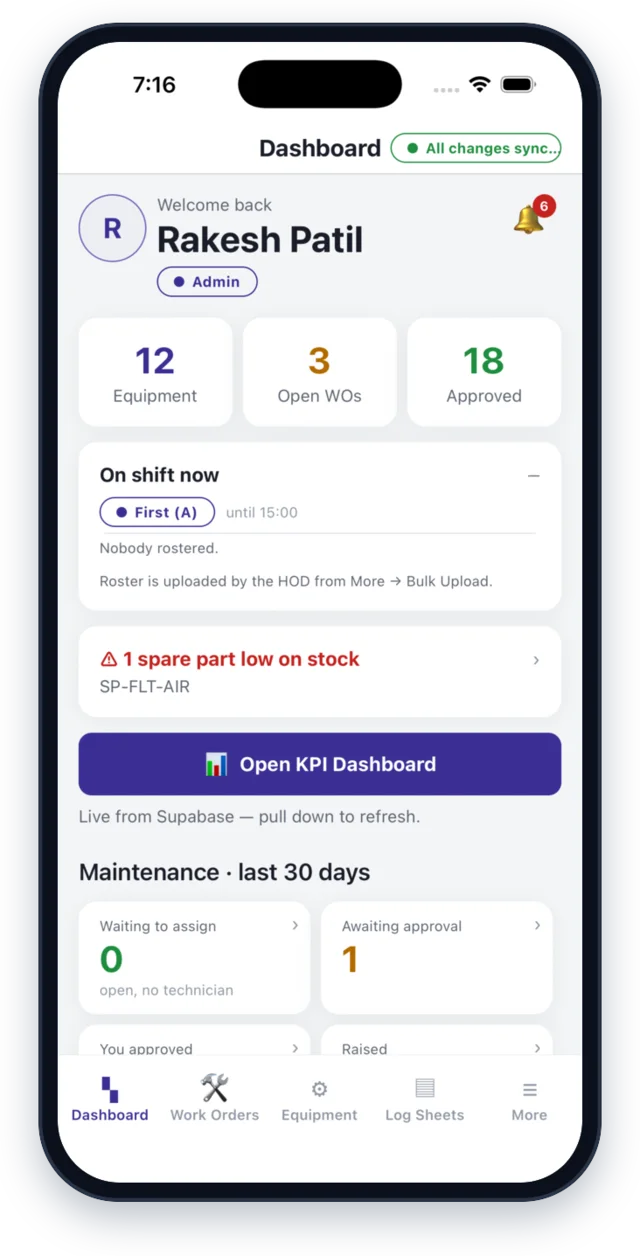
Maintenance dashboard — equipment, open work orders, approvals and who is on shift

Asset management — every machine by section, with its running status
Dashboard
Today at a glance

Maintenance history
Every job on one machine

PM plans
What is due, and when

Daily log sheets
Your parameters, your limits
Designed for the shop floor
Simple Enough for Everyday Plant Use
Software for an industrial environment has to be practical. It is used with gloves nearby, between jobs, next to the machine — not at a desk with time to spare.
Easy to Understand
A minimal learning curve: the screens follow the job as the team already does it.
Mobile Friendly
Useful where engineers and supervisors actually work — away from desks, and even where the network does not reach.
Practical Workflows
Focused on day-to-day maintenance: breakdowns, PM, spares, log sheets and approvals.
Centralized Information
Machines, jobs, parts and history in one place instead of registers, sheets and chat groups.
Who can use it
One App, Every Role in the Maintenance Team
Maintenance Head
Plant-level visibility: approve completed work, watch KPIs by section and export reports.
Maintenance Engineer
Manage and track maintenance activities: assign jobs, follow PM plans, check spares.
Supervisor
Monitor execution: raise breakdowns from the line and see when the machine is back.
Technician
Access assigned jobs, record repairs, parts and photos at the machine.
Plant Head
A clearer view of maintenance: availability, MTTR and cost, without waiting for month end.
Business value
Why Plants Choose Practical Digital Tools
Better Visibility
Know what maintenance activities are happening, and what is waiting.
Better Organization
Structure maintenance activities and records around machines and sections.
Better Traceability
Keep a digital record of who did what, when, and with which parts.
Better Standardization
Move every section toward the same maintenance workflow.
Better Accessibility
Make the relevant information easy to reach, on the phone already in the pocket.
A different way to start
Enterprise Software Isn't the Only Way to Digitalize a Plant
Large enterprise platforms can be powerful, but not every manufacturing organization needs the same scale, complexity or investment.
Yantra Paalan is being developed with a different philosophy — provide practical maintenance-management capabilities that make sense for Indian manufacturing businesses, especially small and medium-sized plants.
Get the app
Take Maintenance Management With You
Yantra Paalan is free to download. Your plant is registered first; your administrator then creates an account for each person, who signs in with an employee ID and PIN.


For iPhone and iPad on the App Store, and for Android on Google Play.
How the app handles personal data: Yantra Paalan privacy policy.
 Scan with your iPhone camera
FAQ
Questions Plants Ask Us
What is Yantra Paalan?
Yantra Paalan is a maintenance-management (CMMS) app for manufacturing and process plants. It brings breakdown and preventive-maintenance work orders, equipment records with QR labels, spare parts, operator log sheets and reliability KPIs such as MTTR, MTBF and availability into one mobile app.
Who is Yantra Paalan designed for?
Maintenance heads and managers, maintenance engineers, production supervisors, technicians and plant heads — everyone who raises, does, approves or reviews maintenance work.
Is Yantra Paalan suitable for small manufacturing plants?
Yes — it is designed with small and medium-sized plants in mind. Setup starts from Excel templates for your sections, equipment, spare parts, PM plans and employees, so you begin with the data you already have. Tell us about your plant and we will tell you honestly whether it fits.
Can technicians use Yantra Paalan from a mobile device?
Yes. Yantra Paalan is a mobile app. Technicians sign in with their employee ID and PIN, see the jobs assigned to them and record repairs at the machine. Work is saved on the phone when there is no network and syncs when the connection returns.
Is Yantra Paalan available on iPhone?
Yes. Yantra Paalan is live on the Apple App Store for iPhone and iPad. Open the App Store listing.
Is Yantra Paalan available on Android?
Yes. Yantra Paalan is live on Google Play for Android. Open the Google Play listing.
Where is our plant's data stored?
Yantra Paalan runs on servers in India. Each plant's data is kept separate from every other plant's, and access inside a plant follows each person's role. The full detail is in the Yantra Paalan privacy policy.
How can I request a demo?
Use the contact form and choose Yantra Paalan as your area of interest. We will arrange a walkthrough of the app using a demonstration plant.
How is Yantra Paalan priced?
Yantra Paalan is licensed per plant. Please contact us for current pricing and plan details.
See Yantra Paalan on Your Own Plant's Terms
Tell us how maintenance runs at your plant today. We will show you what the same week looks like in Yantra Paalan.